AI Automation Services for Small Businesses: What to Automate and How to Choose
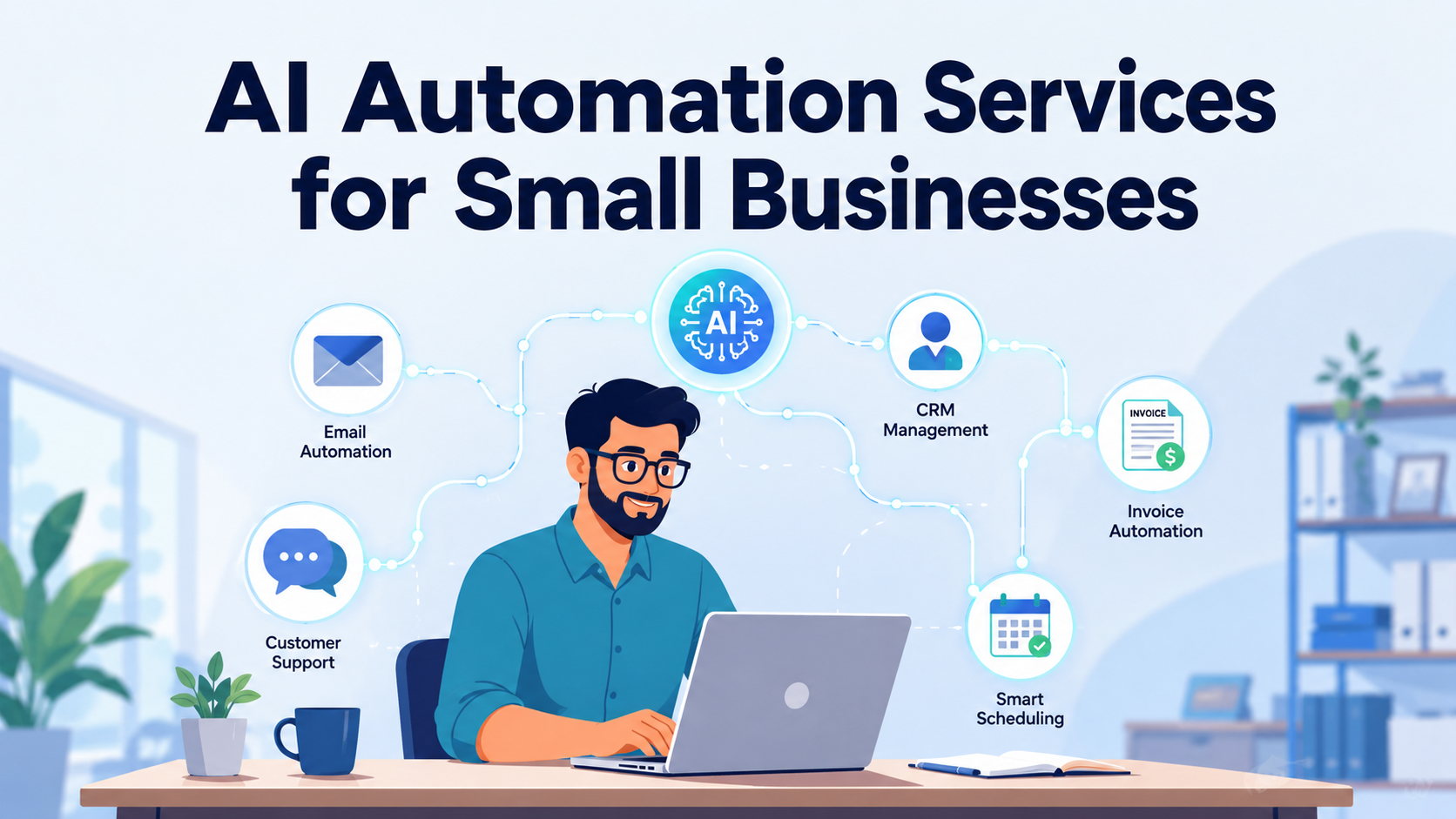
AI automation services for small businesses help owners turn repetitive work into reliable workflows. Instead of asking employees to copy information between tools, monitor every inbox, remember every follow-up, or manually sort routine requests, an automation system can complete defined steps and send exceptions to a person.
The best result is not simply “more AI.” It is less avoidable work, faster handoffs, clearer records, and more time for decisions and customer relationships. A strong service provider starts with the business process, identifies where automation is appropriate, connects the necessary platforms, tests the workflow, trains the team, and monitors performance after launch.
This guide explains the main types of AI automation services, where they are useful, how implementation works, what costs to consider, and how to evaluate tools, agencies, and consultants without being distracted by hype.
What Are AI Automation Services for Small Businesses?
AI automation services are professional services that design, build, connect, test, and maintain workflows that use artificial intelligence, business rules, and software integrations to complete recurring tasks.
A typical engagement may include:
Auditing current processes
Mapping triggers, decisions, actions, and exceptions
Selecting suitable automation tools or platforms
Connecting email, forms, calendars, customer relationship management systems, spreadsheets, help desks, accounting software, or other business applications
Configuring AI to classify, summarize, extract, draft, or route information
Adding approvals and human-review checkpoints
Testing ordinary cases and edge cases
Training employees
Monitoring errors, usage, and performance after deployment
This is broader than buying access to an AI tool. A subscription gives the business software. An automation service turns that software into an operating workflow built around the company’s actual processes.
AI Automation vs. Traditional Automation
Traditional automation follows fixed rules. AI automation can interpret less-structured information before taking an action.
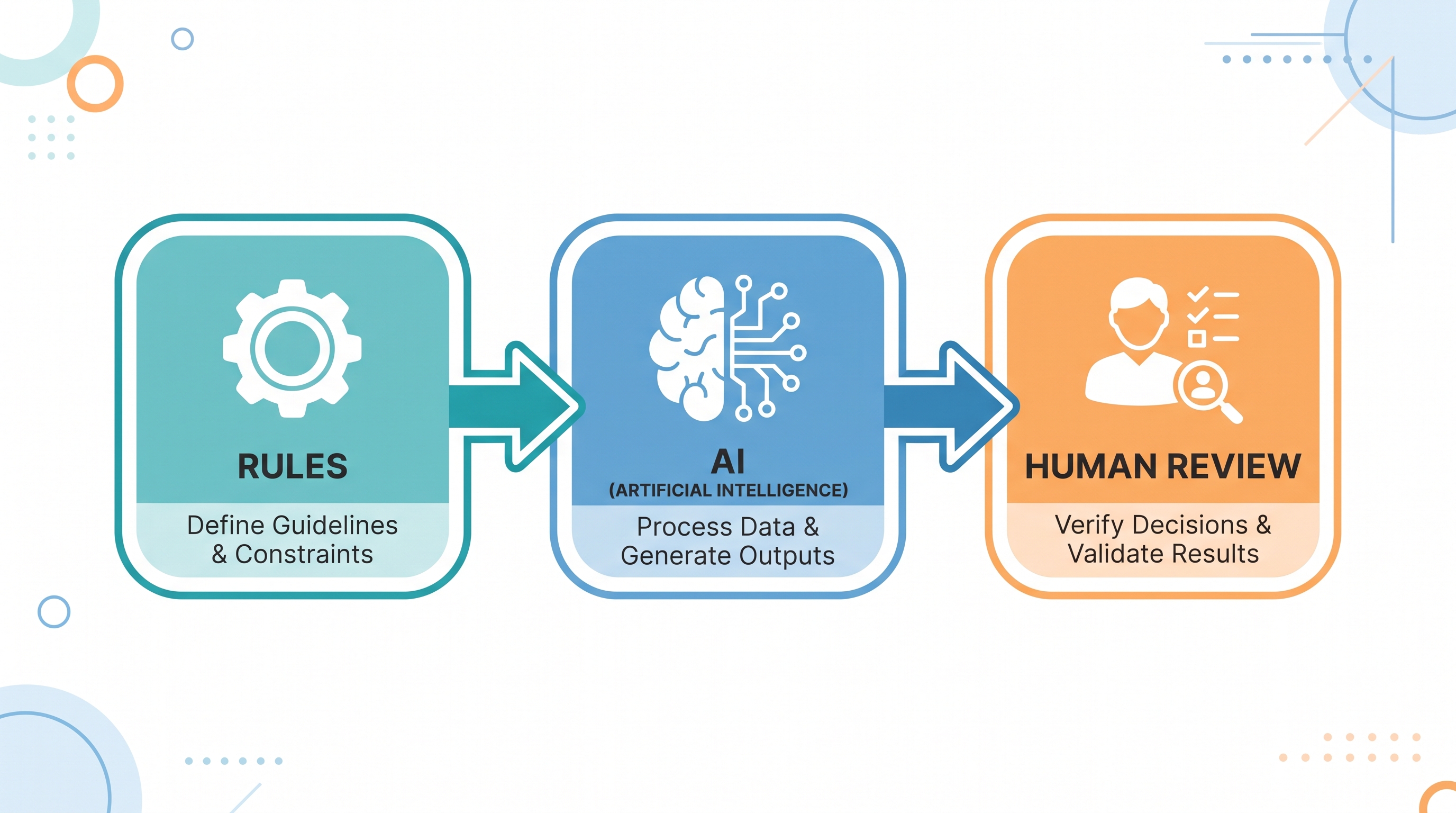
For example, a traditional workflow might send the same confirmation email whenever a form is submitted. An AI-assisted workflow could first identify whether the submission is a sales inquiry, support request, job application, or vendor message, then route it to the appropriate system and prepare a relevant response.
The two approaches are often used together:
Rules are appropriate for predictable conditions, required approvals, deadlines, and system actions.
Artificial intelligence is useful for interpreting text, summarizing documents, extracting information, categorizing requests, or drafting a response.
Human review remains important when an action affects money, legal obligations, sensitive customer situations, regulated data, or the company’s reputation.
The most dependable systems do not use AI for every step. They use it where interpretation adds value and use deterministic rules where consistency matters more.
What Problems Do AI Automation Services Solve?
Small businesses often do not have separate teams for sales operations, customer support, data administration, scheduling, and reporting. The same people may switch between customer work and administrative tasks throughout the day.
AI automation services can address several recurring problems.
Repetitive manual work
Employees may repeatedly enter contact details, rename files, summarize calls, send reminders, update records, or transfer information between platforms. Workflow automation tools such as Zapier and Make are commonly used to connect applications and trigger cross-platform actions.
Slow or inconsistent follow-up
A lead may complete a form, send an email, or leave a voicemail but receive no response until someone checks the relevant channel. An automated workflow can acknowledge the inquiry, create a record, notify the responsible person, and schedule the next action.
Disconnected business systems
Information may be spread across email, spreadsheets, calendars, a CRM, a project management platform, and accounting software. Automation can move approved data between these systems and reduce manual copy-and-paste work.
High volumes of routine customer questions
Customer support automation can answer approved frequently asked questions, check information from connected systems, triage requests, and escalate sensitive or unusual cases. The value depends heavily on the quality of the knowledge source and the handoff process.
Unstructured documents and messages
Invoices, intake forms, PDFs, emails, and call transcripts do not always arrive in a database-ready format. AI can extract or summarize relevant information before a rules-based workflow validates and routes it.
Weak process visibility
When activity is handled manually, owners may struggle to see which leads were contacted, which requests are unresolved, or where work is delayed. Automated logging and exception reports can make the workflow easier to audit.
The Main Types of AI Automation Services for Small Businesses
The right service category depends on the workflow causing the most friction. Small businesses should start with the operational problem rather than selecting a tool first.
| Service type | What it can do | Good first use cases | Where human review matters |
|---|---|---|---|
| Workflow integration | Moves data and triggers actions across business applications | Form-to-CRM entry, task creation, status notifications | Incorrect or incomplete source data |
| Customer support automation | Classifies inquiries, suggests or sends approved answers, and escalates cases | FAQs, order-status requests, basic triage | Complaints, refunds, vulnerable customers, unusual requests |
| Sales and CRM automation | Captures, enriches, qualifies, assigns, and follows up with leads | Lead routing, follow-up reminders, CRM updates | Lead scoring criteria, pricing, promises, sensitive outreach |
| Document automation | Extracts, summarizes, validates, and routes information | Invoices, forms, applications, intake packets | Low-confidence extraction and consequential records |
| Scheduling and voice automation | Handles appointment requests, confirmations, reminders, and basic call intake | Booking, rescheduling, missed-call capture | Complex requests, emergencies, cancellations with financial impact |
| Marketing operations | Drafts, repurposes, schedules, and reports on content | Email drafts, campaign briefs, social scheduling | Brand claims, factual accuracy, approval before publishing |
| Meeting and knowledge automation | Transcribes discussions, summarizes decisions, and creates tasks | Client-call notes, internal action items, knowledge search | Confidential conversations and incorrectly assigned actions |
| Finance and administrative automation | Categorizes documents, routes approvals, and flags exceptions | Receipt capture, invoice routing, payment reminders | Accounting treatment, payment approval, tax and compliance decisions |
| Reporting automation | Consolidates activity and highlights anomalies | Weekly operational summaries, pipeline reports, unresolved-task alerts | Interpretation of incomplete or misleading data |
1. Workflow and integration services
Workflow automation connects applications that otherwise require manual handoffs. A new inquiry can create a CRM record, notify a sales channel, add a task, and send an acknowledgment from one trigger.
Zapier is repeatedly identified in the supplied sources as an accessible option for connecting popular business applications. Make is commonly positioned as offering more control for complicated visual workflows, although that additional control may create a steeper learning curve for non-technical teams.
A service provider adds value when the workflow spans several platforms, needs conditional logic, must recover from failures, or requires ongoing maintenance.
2. Customer service automation
Customer service automation can handle frequent, low-complexity questions and send the remaining conversations to an employee. Common functions include:
Identifying the purpose of a message
Retrieving an approved answer from a knowledge base
Checking an order or appointment status
Creating a ticket
Routing an urgent or sensitive case
Preparing a response for human approval
Recording the interaction in a customer system
The goal should not be to prevent customers from reaching a person. A dependable setup defines what the AI may answer, when it must escalate, and what happens when it is uncertain.
Tools discussed in the supplied research include Tidio Lyro for e-commerce support and Botpress for more customizable conversational flows. These examples illustrate different service models rather than a universal ranking: one emphasizes rapid deployment, while the other offers more control and may require more technical configuration.
3. Sales and CRM automation
Sales automation services can reduce the administrative work surrounding lead management. A workflow may:
Capture a lead from a form, email, call, or chat.
Check that required information is present.
Create or update the contact in the CRM.
Categorize the inquiry.
Assign an owner.
Draft an acknowledgment or follow-up.
Create a task if a person needs to respond.
alert management if the lead remains untouched.
AI agents can also support research, personalization, and lead qualification, but vague instructions can produce inconsistent results. Clear criteria and review checkpoints are particularly important when the system scores prospects or sends external messages.
4. Document and data-entry automation
Document automation is useful when employees repeatedly read an incoming document and copy selected fields into another system.
A service may combine:
Optical or structured document intake
AI-based extraction
Format and completeness checks
Confidence thresholds
Human review for uncertain fields
Entry into an accounting, CRM, case-management, or operations system
An audit log of the original document and final action
Potential use cases include invoices, onboarding forms, applications, inspection notes, intake packets, and emailed purchase requests. Layer3 Labs identifies document processing and lead intake as practical first projects because the workflow can be defined and measured.
5. Appointment, call, and voice automation
Scheduling automation can read availability, offer suitable times, send confirmations, issue reminders, and process straightforward rescheduling requests.
Voice automation can answer common questions, collect caller information, book an appointment, or capture a missed-call lead. It requires careful testing because callers may use unexpected language, provide incomplete details, or have urgent needs.
A safe implementation clearly identifies:
What the system is allowed to say
Which appointments it may book
How it verifies customer information
When it must transfer or escalate
How recordings and transcripts are stored
What happens if an integration is unavailable
6. Marketing operations automation
AI can assist with briefs, first drafts, repurposing, scheduling, campaign organization, and reporting. It can make a lean content process more consistent, but published material still requires review for accuracy, brand voice, permissions, and unsupported claims.
The supplied sources discuss tools such as ChatGPT, Claude, Canva AI, Notion AI, HubSpot, and Jasper in content and communication workflows. These are examples of functional categories, not evidence that one tool is best for every business.
7. Meeting, knowledge, and internal operations automation
A meeting workflow can turn a transcript into a summary, extract decisions, create assigned tasks, and place approved notes in the company knowledge system. Fireflies and Notion AI are examples mentioned in the supplied research for transcription, summaries, and internal documentation.
These systems are most useful when the company has clear rules for recording consent, storage, access, task ownership, and review.
What Does an AI Automation Service Provider Actually Deliver?
A professional engagement should produce more than a set of software accounts.
Process discovery
The provider interviews the people who perform the work and documents the current process. This should reveal triggers, inputs, actions, decisions, exceptions, handoffs, and failure points.
Workflow design
The provider proposes a future-state workflow showing:
What starts the automation
Which systems are involved
Where AI is used
Which rules control the process
What requires approval
What is logged
How errors are handled
Who owns the workflow
Platform selection and integration
The provider chooses or configures suitable platforms. The selection may include a general integration tool, an AI model, a purpose-built support or CRM product, and custom logic.
Testing and controlled launch
A supervised pilot should use realistic examples, including incomplete, duplicated, ambiguous, and incorrect inputs. The team should see how the system behaves before it is trusted with a broader workload.
Documentation and training
Employees need instructions explaining what the automation does, where its limits are, how to correct an error, and how to escalate a problem.
Monitoring and maintenance
Automations require maintenance because connected platforms, APIs, data fields, and business processes change. A service agreement should clarify who investigates failures, updates integrations, reviews logs, and adjusts the workflow.
AI Automation Agency, Consultant, or DIY Platform?
The three main options are not direct substitutes.
| Option | Best for | Advantages | Limitations |
|---|---|---|---|
| DIY automation platform | A clear, low-risk workflow and a team comfortable configuring software | Lower initial cash cost, fast experimentation, direct control | Requires internal time, testing, troubleshooting, and maintenance |
| AI automation consultant | A business that needs process analysis, tool selection, or a roadmap | Independent guidance and focused expertise | The business may still need a separate builder or internal operator |
| Done-for-you agency | Multi-step workflows, several integrations, limited internal capacity, or a need for ongoing support | Design, implementation, training, and maintenance can be combined | Higher cost; quality and transparency vary between providers |
| Custom development team | Unique logic, proprietary systems, strict requirements, or product-level automation | Maximum control and customization | Longer implementation, greater cost, and continued engineering needs |
| Purpose-built software | A standard workflow already solved by a mature product | Faster setup and less custom maintenance | The business may need to change its process to fit the product |
A hybrid approach is common: buy established software for standard functions and use professional services to integrate, configure, and govern the workflow.
When Should a Small Business Hire an Automation Service?
Hiring outside help is more likely to be worthwhile when:
A repetitive workflow consumes meaningful staff time every week.
Leads, requests, or tasks are being missed between systems.
The process spans multiple tools or departments.
The team lacks time to design and test the automation.
Failures need monitoring and a defined support response.
The workflow uses customer, financial, health, legal, or other sensitive data.
A wrong action could damage revenue, customer trust, or compliance.
The business needs documentation and staff training, not just software access.
A DIY tool may be enough when the workflow is simple, low-risk, and easy to verify, for example, creating an internal task after a form submission.
Automation may be premature when the underlying process changes constantly, nobody owns it, the source data is unreliable, or the task happens so rarely that the setup and maintenance would cost more than the manual work.
How Much Do AI Automation Services Cost?
The cost depends on workflow complexity, usage volume, number of integrations, data sensitivity, customization, testing requirements, and ongoing support. Software subscription price alone does not represent the full investment.
The supplied sources show why broad price promises are misleading. Some no-code tools advertise free or relatively low-cost entry plans, while professional service engagements include process mapping, implementation, testing, training, and monitoring.
One automation provider’s 2026 guide publishes illustrative ranges of $3,000–$12,000 for a workflow audit, $8,000–$25,000 for a pilot setup, $15,000–$75,000 for a production workflow, and $1,500–$6,000 for monthly monitoring. These figures are that provider’s published guidance, not an independent market benchmark, and actual proposals may differ substantially.
When comparing quotes, ask vendors to separate:
Discovery or workflow audit
One-time implementation
Custom development
Third-party software subscriptions
AI model or usage charges
Support and monitoring
Maintenance and change requests
Training
Data migration or cleanup
Cancellation, export, and handover costs
A low setup fee can become expensive if the workflow needs frequent repairs. A higher implementation fee may be justified if it includes careful testing, documentation, and reliable support. Compare the complete operating cost rather than the headline monthly price.
How to Calculate the Potential Return
Measure return at the workflow level.
A simple estimate is:
Monthly value of time saved = hours saved per month × fully loaded hourly cost
Then consider:
Estimated monthly benefit = value of time saved + avoidable error cost + attributable additional value − monthly operating cost
Do not assume that every saved hour becomes revenue. The business must decide how the freed capacity will be used.
Useful baseline metrics include:
Minutes spent per transaction
Number of transactions per week
Response time
Percentage of inquiries receiving a follow-up
Error or rework rate
Number of overdue tasks
Cost per completed process
Percentage of cases requiring human review
Number and duration of automation failures
Measure the existing manual process before implementation, then compare it with pilot results. This is more credible than applying a generic ROI promise to every business.
How to Choose an AI Automation Company
1. Look for process-first discovery
A strong provider asks how the work happens before recommending platforms. If the sales conversation begins and ends with a favorite tool, the proposed system may not fit the business.
2. Ask for a workflow diagram
The proposal should show the trigger, data sources, decision points, actions, approvals, alerts, and fallback path. The business owner should be able to understand it without technical jargon.
3. Verify relevant implementation experience
Ask for examples involving similar workflow complexity, systems, and risk. A provider may be capable without specializing in the exact industry, but it should be able to explain how its experience transfers.
4. Examine integration depth
Confirm whether the proposed platforms have native integrations, use an automation connector, or require custom code. Ask what happens if an API or field changes.
5. Review data practices
Ask:
What data is sent to each provider?
Where is it stored and processed?
Who can access it?
Is the data used to train external models?
How long is it retained?
Can records be deleted or exported?
Which contractual and technical controls are included?
Generic statements such as “enterprise-grade security” are not enough. The answer should be specific to the proposed workflow.
6. Require human-review rules
The provider should define when the automation may act independently and when it must request approval. Low-confidence outputs should create alerts or review tasks rather than silent errors.
7. Check monitoring and support
Ask who receives failure notifications, how quickly issues are investigated, what support hours apply, and whether routine platform changes are included.
8. Define ownership and portability
Confirm who owns the workflows, prompts, documentation, accounts, custom code, and data. The company should know what it can export if the relationship ends.
9. Agree on measurable success criteria
A proposal should identify the baseline and the metric the pilot is expected to improve. Appropriate measures might include response time, manual processing time, error frequency, completion rate, or percentage of cases resolved without intervention.
10. Start with a pilot
The supplied sources consistently favor beginning with one high-frequency, clearly defined workflow and expanding only after it works.
Red Flags When Evaluating Automation Services
Be cautious if a provider:
Guarantees broad business growth without a documented connection between the workflow and revenue.
Recommends automating many departments before studying one process.
Cannot explain where AI may be wrong.
Has no human-review or fallback plan.
Avoids questions about data access and retention.
Treats launch as the end of the project.
Does not provide logs, documentation, or ownership terms.
Hides usage charges or third-party subscription costs.
Uses fictional demonstrations as if they were customer results.
Promises a fully autonomous system for decisions that require professional judgment.
Requires a long commitment before a limited pilot can be evaluated.
Cannot explain how employees or customers reach a human.
Promotional comparison articles often rank the publisher’s own service highly. That does not automatically invalidate the information, but it makes transparent attribution and independent verification important. Several supplied sources openly promote their own platforms or agencies, so vendor claims should be treated as claims rather than neutral market evidence.
A Practical Implementation Roadmap
Step 1: Choose one workflow
Select a task that occurs frequently, follows a recognizable pattern, and has an identifiable owner. Lead intake, support triage, document processing, CRM updates, and appointment requests are common starting points. [1]
Step 2: Document the current process
Record every step, including informal workarounds. Note the systems used, average volume, time required, errors, delays, exceptions, and approvals.
Step 3: Define the outcome
Choose a measurable target such as faster first response, fewer missing fields, lower processing time, or more complete CRM records.
Step 4: Separate rules from judgment
Identify which steps should always follow fixed logic, which steps benefit from AI interpretation, and which decisions must remain human.
Step 5: Prepare the data and knowledge sources
Remove duplicates, correct obsolete information, standardize key fields, and approve the documents the system may use. An AI support agent trained on contradictory policies will produce unreliable answers even if the technology is working correctly.
Step 6: Build a supervised pilot
Use real examples, but limit the workflow’s authority. Early versions might draft rather than send, recommend rather than approve, or process only a subset of requests.
Step 7: Test exceptions
Test missing fields, unusual language, duplicate records, system outages, incorrect attachments, angry customers, and requests outside the intended scope.
Step 8: Train the team
Show employees what the automation handles, how they review outputs, where they report errors, and who owns changes.
Step 9: Measure and improve
Compare the pilot with the baseline. Review both successful cases and failures. Remove unnecessary steps before expanding.
Step 10: Expand to an adjacent workflow
Once the first workflow is stable, connect a closely related process. For example, after lead intake works reliably, the business might add follow-up reminders or sales-pipeline reporting.
Common Mistakes to Avoid
Automating an unclear process
Automation reproduces the process it is given. If responsibilities and decisions are unclear, the system may make confusion happen faster.
Buying too many disconnected tools
A collection of subscriptions is not an automation strategy. Each platform creates setup, access, billing, and maintenance work.
Using AI where a simple rule would be safer
If a condition can be expressed reliably with fixed logic, AI may add unnecessary variation.
Allowing autonomous action too early
Start with recommendations, drafts, or limited permissions. Increase autonomy only after the workflow performs reliably.
Skipping staff involvement
Employees who perform the task often know the exceptions that are missing from official process documentation.
Ignoring maintenance
Connected tools and business rules change. Automations need an owner, monitoring, and a change process. [2]
Measuring only activity
The number of automated actions is not the same as business value. Measure the operational result: time, quality, completion, response, error rate, or attributable financial impact.
Which Businesses Benefit Most?
AI automation services can be useful across industries, but the strongest candidates tend to share process characteristics rather than a specific business label.
They often have:
Frequent inbound inquiries
Repetitive administrative work
Several software platforms
A defined customer journey
Time-sensitive follow-ups
Structured documents or forms
Recurring appointments
High volumes of similar requests
A need for traceable records
Examples include professional services, home services, agencies, clinics, e-commerce businesses, property-related services, business-to-business service firms, and local appointment-based companies. Suitability still depends on the individual workflow, data, risk, and economics.
Frequently Asked Questions
What are AI automation services for small businesses?
AI automation services help a small business analyze a workflow, choose and configure tools, connect applications, test the process, train users, and maintain the system. They may combine AI interpretation, fixed business rules, integrations, and human approvals.
What should a small business automate first?
Start with one frequent, repeatable, measurable task. Good candidates include lead intake, support triage, appointment requests, document data entry, CRM updates, or routine internal notifications. Avoid starting with a broad transformation covering the entire company.
Do small businesses need an AI automation agency?
Not always. A simple, low-risk trigger-and-action workflow may be manageable with a no-code platform. An agency or consultant becomes more valuable when the process spans several systems, requires AI interpretation, handles sensitive data, needs custom logic, or must be monitored after launch.
Is Zapier an AI automation service?
Zapier is primarily an automation platform that connects applications and supports multi-step workflows. A business can configure it directly, or an automation service provider can use it as part of a larger solution. The platform is a tool; the service includes process design, implementation, testing, and support.
How much do AI automation services cost for a small business?
There is no reliable universal price. Cost varies with the number of workflows, integrations, users, transactions, AI usage, customization, security requirements, testing, and ongoing support. Ask for separate pricing for discovery, implementation, software, usage, maintenance, and future changes.
Can AI automation replace employees?
AI automation is best suited to repetitive, process-driven portions of work. It can change how much time employees spend on administration, but customer relationships, accountability, complex judgment, and exception handling still require people. The appropriate staffing impact depends on the business and should not be assumed from a tool demonstration.
Is AI automation safe for customer data?
It can be implemented with appropriate controls, but safety is not automatic. The business must evaluate access, storage, retention, model-training terms, permissions, logging, deletion, regulatory obligations, and vendor contracts. Sensitive workflows should include limited access and human review.
How long does implementation take?
The timeline depends on the workflow. A simple integration may be configured quickly, while a multi-system production process may require discovery, data preparation, custom development, testing, training, and monitoring. Ask the provider for a phased timeline with a defined pilot rather than accepting a generic launch promise.
Conclusion
AI automation services for small businesses are most valuable when they remove a specific operational bottleneck without reducing control. The best first project is usually a frequent, well-understood workflow with a clear owner, measurable baseline, manageable risk, and obvious handoff between automation and human judgment.
Do not begin by asking which AI platform is most impressive. Begin by asking which repeated process costs the business the most time, creates the most avoidable errors, or causes the most missed follow-ups. Map that process, test one supervised automation, measure the result, and expand only after it proves dependable.
For a small business evaluating providers, the next logical step is a workflow audit not a company-wide technology purchase. Document one process, estimate its current cost, identify its exceptions, and use that information to compare a DIY platform, consultant, agency, or custom build on equal terms.


